Project Management
AI Intergration
B2B SaaS
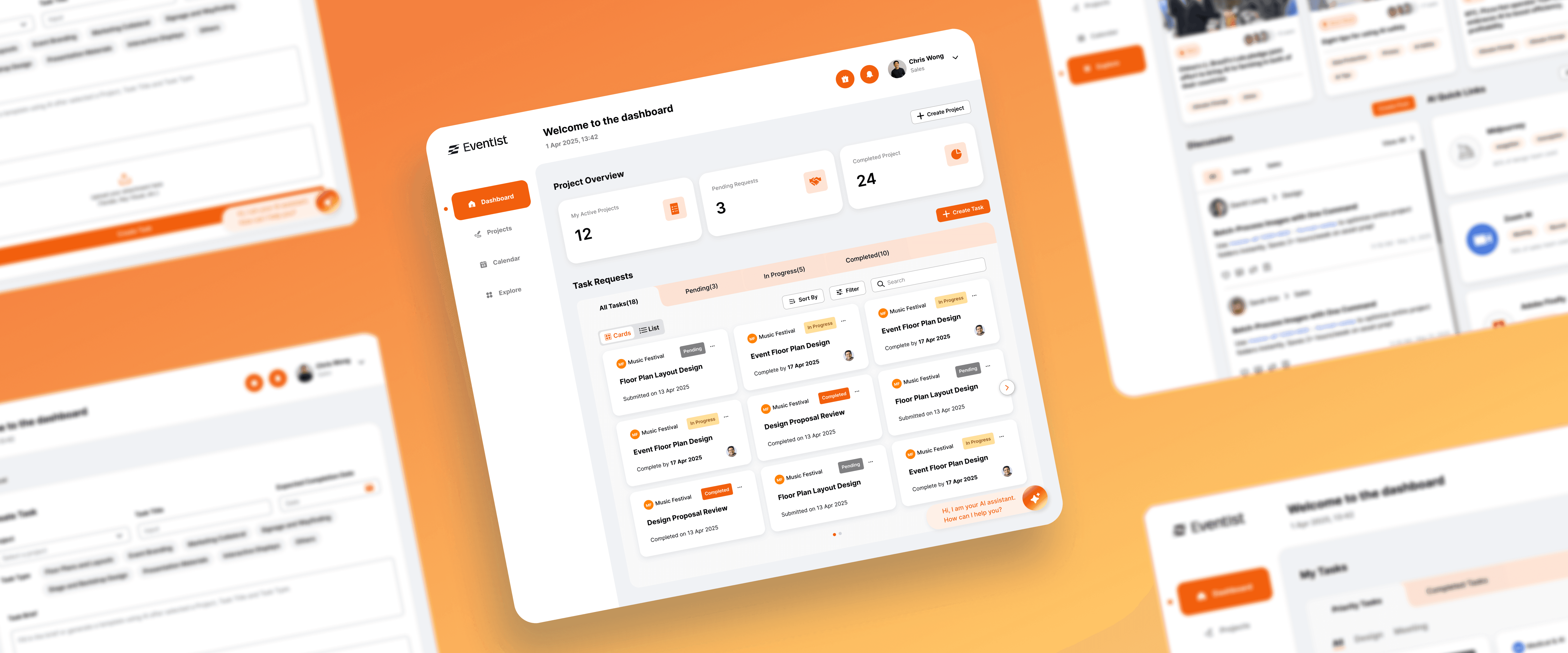
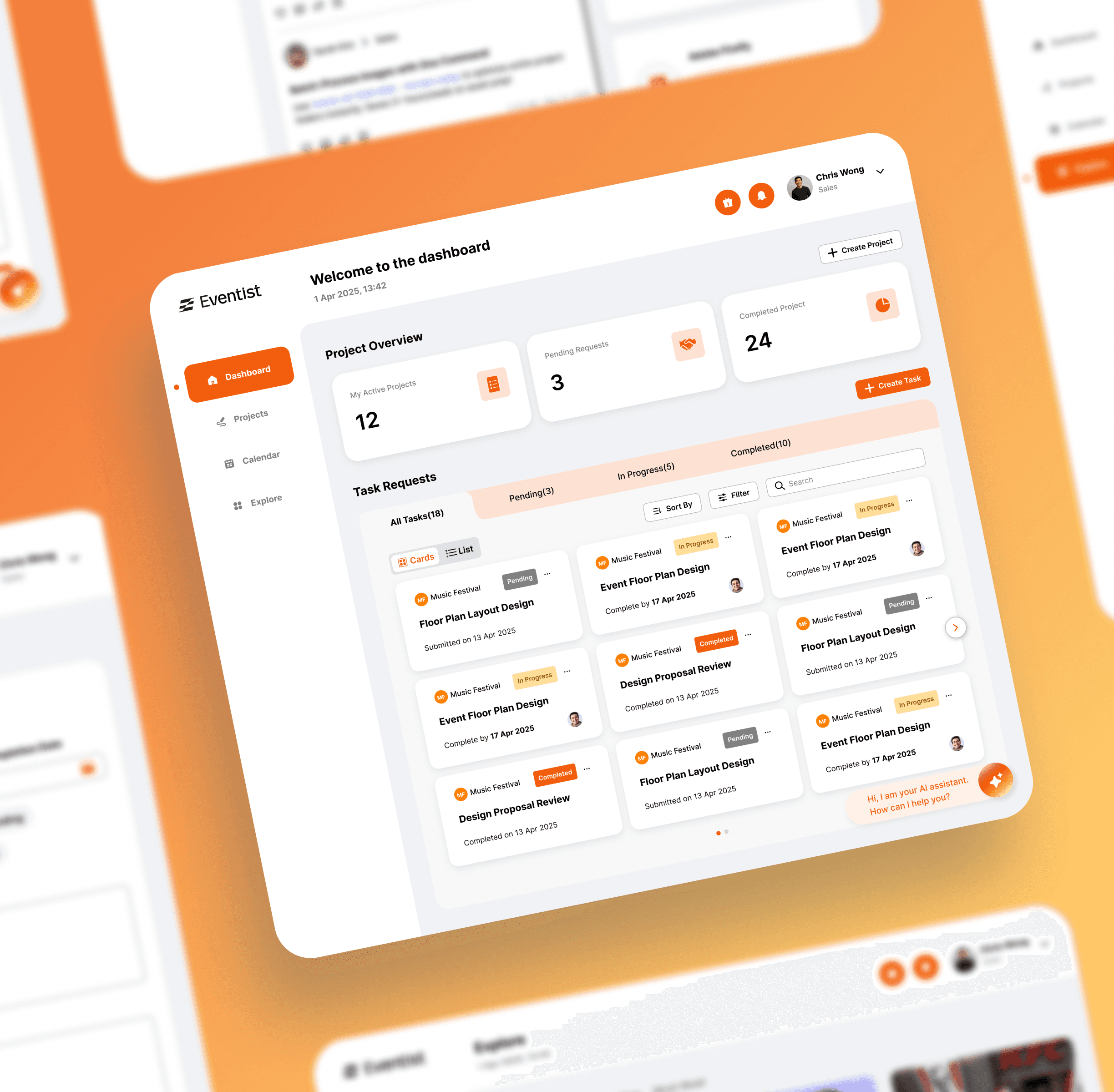
Transforming Internal Project Workflows with an AI-Powered Dashboard
In mid-2025, I partnered with a Hong Kong event agency struggling with workflow chaos after their project volume doubled. As the lead freelance UX Designer, my mission was to design a solution from the ground up: Eventist Dashboard is a unified, AI-powered platform to streamline collaboration and project management for their three core user groups: Sales, Team Leads, and Designers.
MY ROLE
UX Designer (Ideation, Wireframe, Interactive Prototype, UI Library / Design System, Information Architecture)
TEAM
Project Manager, 2 UI Designers, UX Designer (Me),
TIMELINE
5 months (mid - late 2025 )
RESULTS
Full-fidelity interactive prototypes covering all core features and user interactions
Secured client buy-in for AI integration, delivered a dev-ready design system, and established a logic-based workflow for implementation.
background
CLIENT CONTEXT
A Premier Creative Force
Eventist is a premier Hong Kong agency specializing in large-scale corporate events. They built their reputation on creativity and a high-touch, boutique approach to project management.

CHALLENGES
Outgrowing Manual Workflows
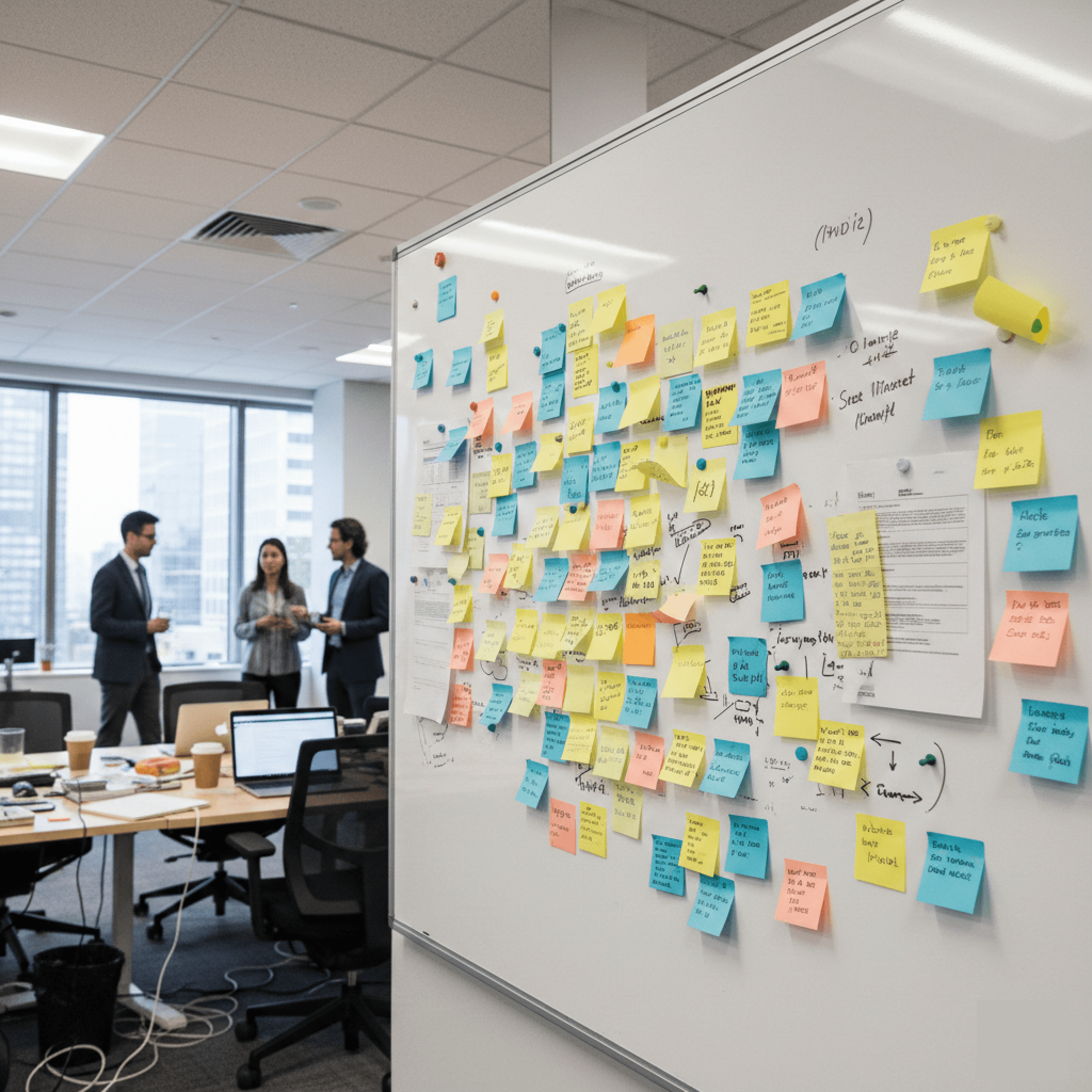
In 2025, their project volume doubled overnight, causing manual workflows to crumble. Facing data loss and team burnout, they needed a centralized platform to transition from a boutique operation to a scalable business.
AI INTEGRATION
The AI Mandate vs. User Trust
The client had a requirement that integrating AI to future-proof the agency. I had to design an experience that introduced AI as a supportive partner, turning skepticism into adoption.
Where did I start?
My design process began by looking into the foundational research conducted by the project management team. They performed 13 in-depth, qualitative interviews with key internal stakeholders. So I synthesise these rich findings into an actionable design strategy.
Identifying Problem
Research revealed a tangled workflow lacking a central hub. This caused constant back-and-forth, lost feedback, and duplicated effort.
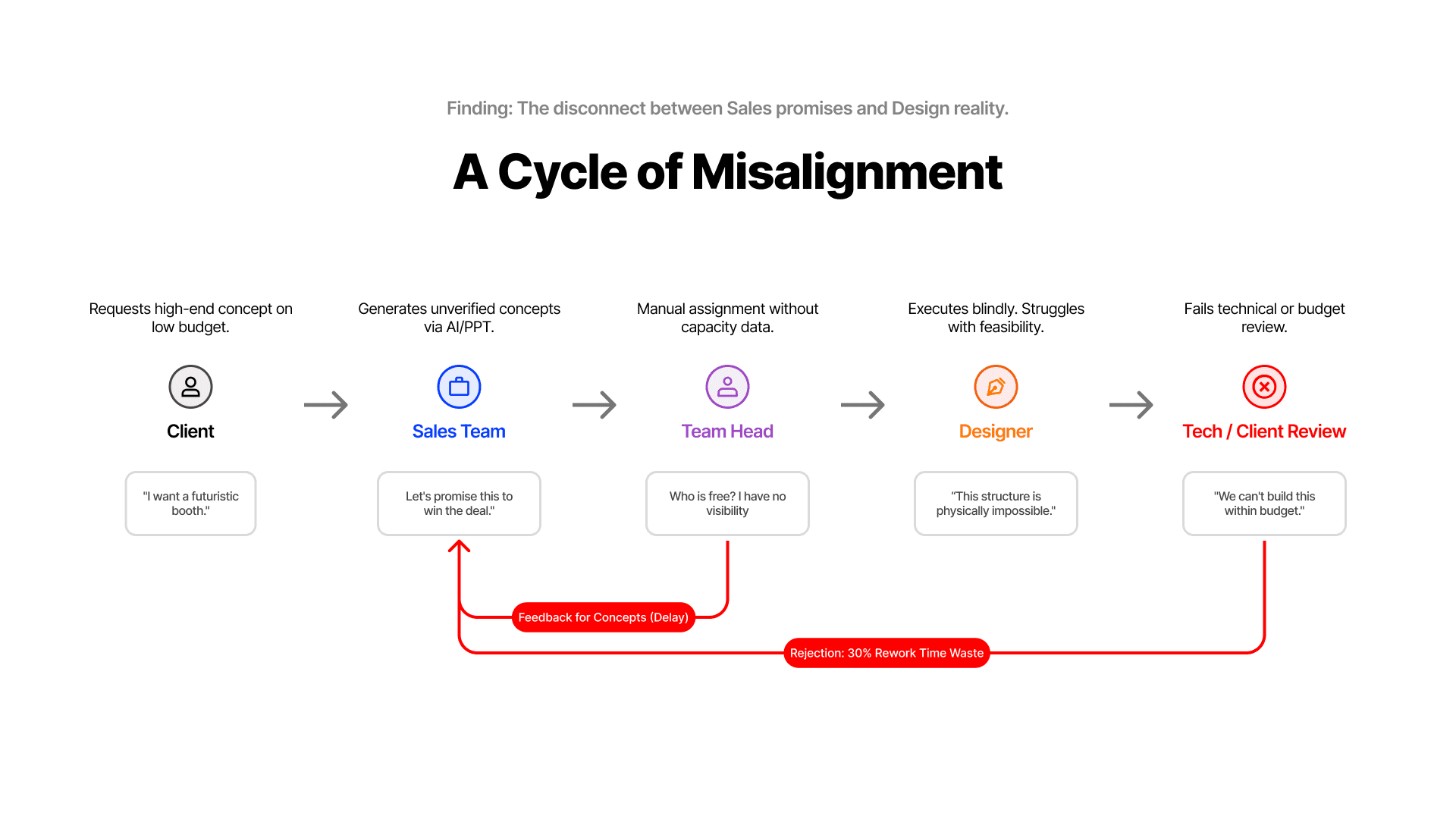
*Existing workflow diagram for the traditional event and exhibition industry from the research
Understanding Our Internal Users
To pinpoint the source of these growing pains, I investigated the daily workflows of our key internal teams: Sales, Design, and Management based on the research. The analysis uncovered four critical challenges that were creating operational friction and directly impacting project delivery.
Information Silos
"I feel like I'm constantly chasing information instead of doing my actual job."
No Single Source of Truth
"We can't confidently make decisions because we're never sure if we're looking at the latest information."
Inefficient Workflows
"My day is a stream of interruptions that kill my focus and my team's productivity."
Ambiguous Communication
"Vague requests and misaligned expectations lead to endless rework."
How Might We Turn Challenges into Opportunities?
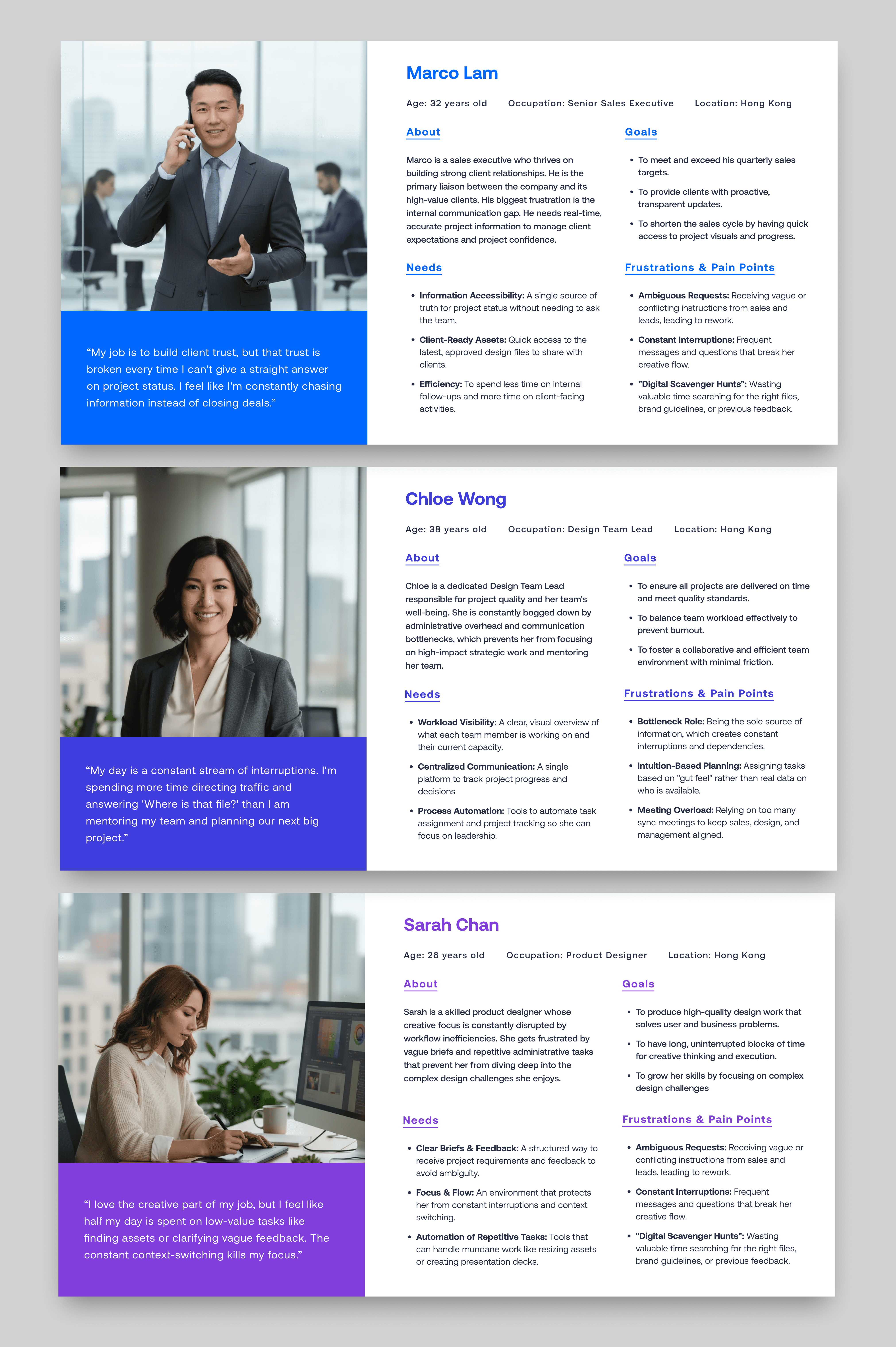
Based on the four core challenges uncovered in the research—Information Silos, No Single Source of Truth, Inefficient Workflows, and Ambiguous Communication—I translated these user frustrations into actionable "How Might We" (HMW) questions. This reframing helped the team shift from a problem-focused mindset to a solution-oriented one.
We brainstormed several HMWs, focusing on the unique needs of our three key user groups:
For the Sales Team
"HMW help our Sales team create clear and reasonable design requests without needing to understand complex design terminology?"
01
For the Team Head
"HMW empower our Team Head to assign tasks efficiently and fairly, with full visibility of her team's workload??"
02
For the Designers
"HMW protect our Designers' focus time by creating a single source of truth for their priorities and reducing constant interruptions??"
03
design principle
Based on the insights, I established three core design principles for th design:

Augmentation
Empowering users, not replacing them. The AI acts as a co-pilot to automate repetitive tasks, allowing users to focus on high-impact, strategic work.

Focused
Delivering role-based clarity. Each user sees a tailored interface with only the information and tools relevant to their specific workflow, eliminating distractions.

Transparency
Building trust through explainable AI. The system provides clear justifications for its recommendations, ensuring every decision is informed and transparent.
Hypothesis & Validation
The Initial Concept
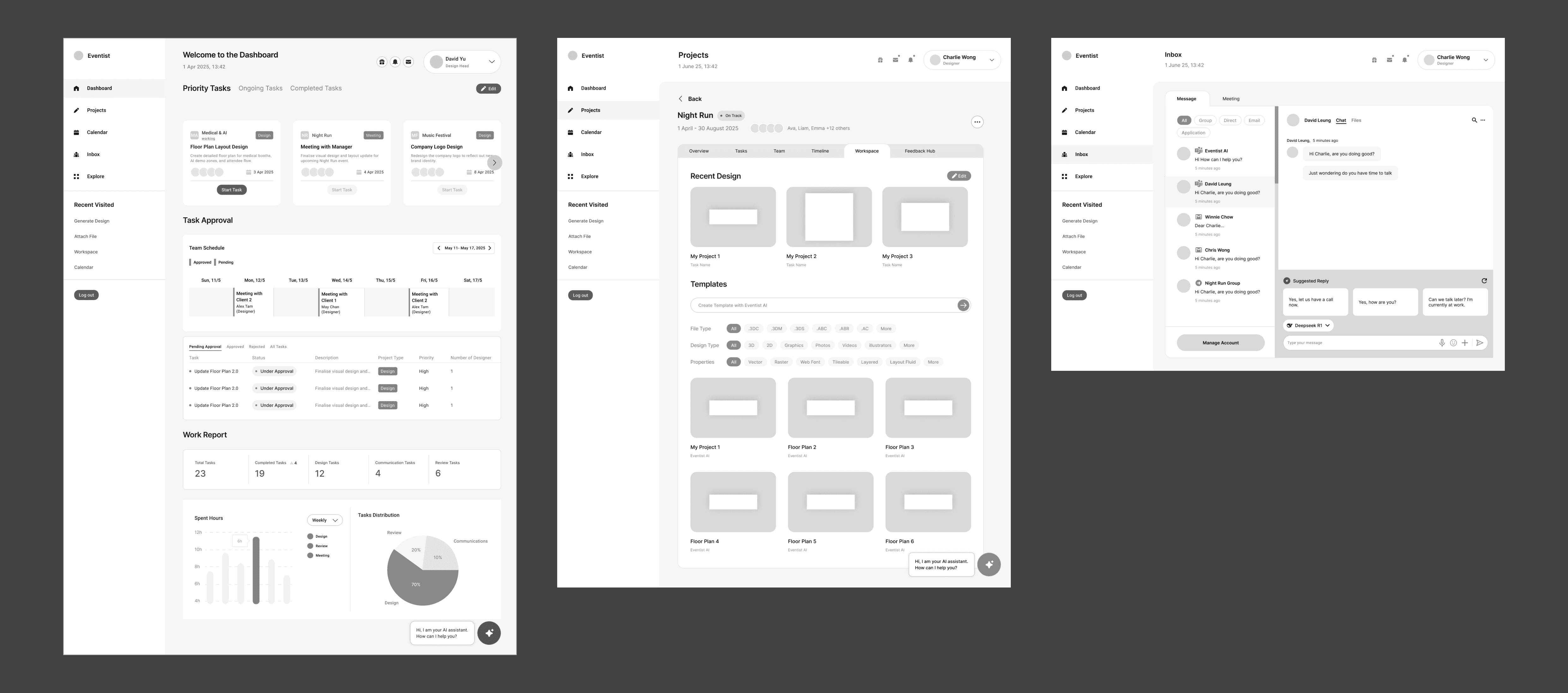
Following research insights and two rounds of stakeholder discovery, the joint directive was to build a comprehensive "All-in-One Ecosystem." A platform that centralizes operations by integrating a full Sales CRM, Real-time Inbox, and Social Feedback Hub directly alongside the AI features.
My grey-scale prototype faithfully visualised these extensive requirements to test the architecture as below.
The Reality Check (The "Aha!" Moment)
However, once stakeholders saw the requirements visualized in the grayscale prototype, the complexity became undeniable.
Operational Redundancy. The Project Manager and Client realized that forcing Sales teams to abandon their existing CRM for this new tool would create friction, not efficiency.
Cognitive Overload. The "everything-at-once" approach diluted the core value proposition—AI assistance.
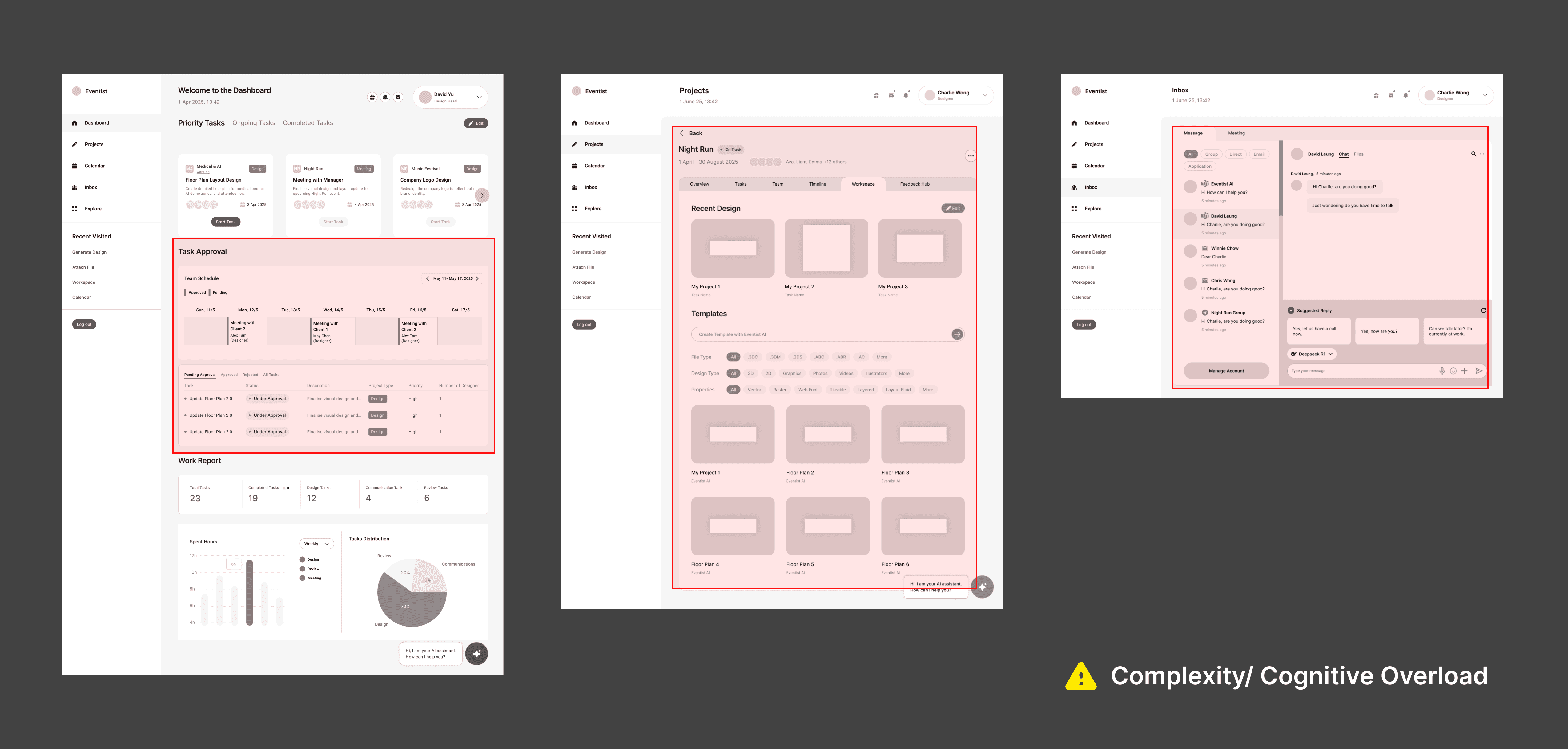
🔎 Key Decision: Using the grayscale as a decision tool, I made a joint decision to de-scope. I stripped away the general CRM and communication layers to refocus entirely on the unique value: The AI-Assisted Task Hand-off.
Architecture
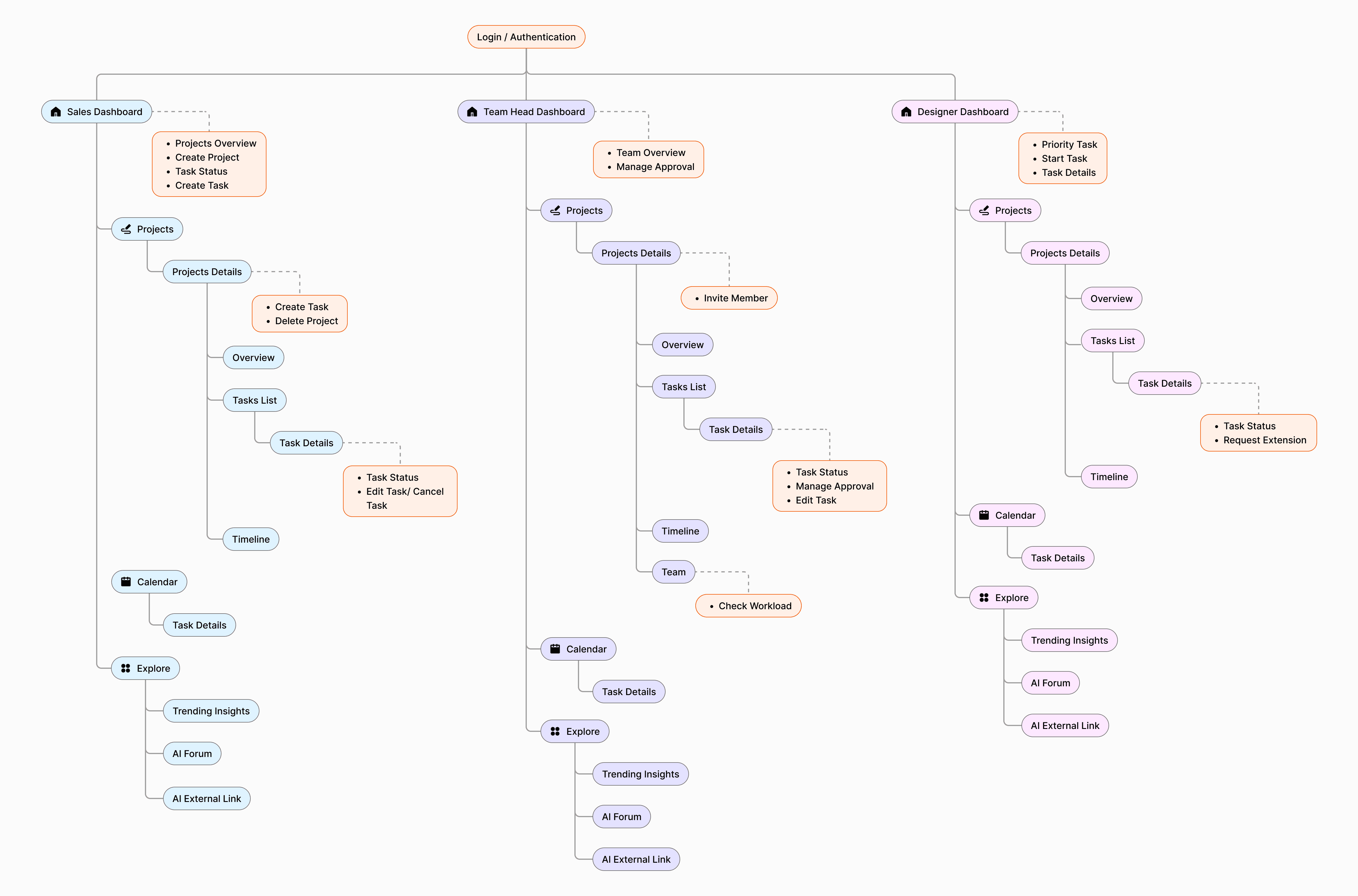
To eliminate the friction often found between Sales and Design teams, I designed a unified sitemap and workflow that prioritizes transparency. Instead of relying on back-and-forth emails, the system uses AI to validate deadlines in real-time.
User Flow
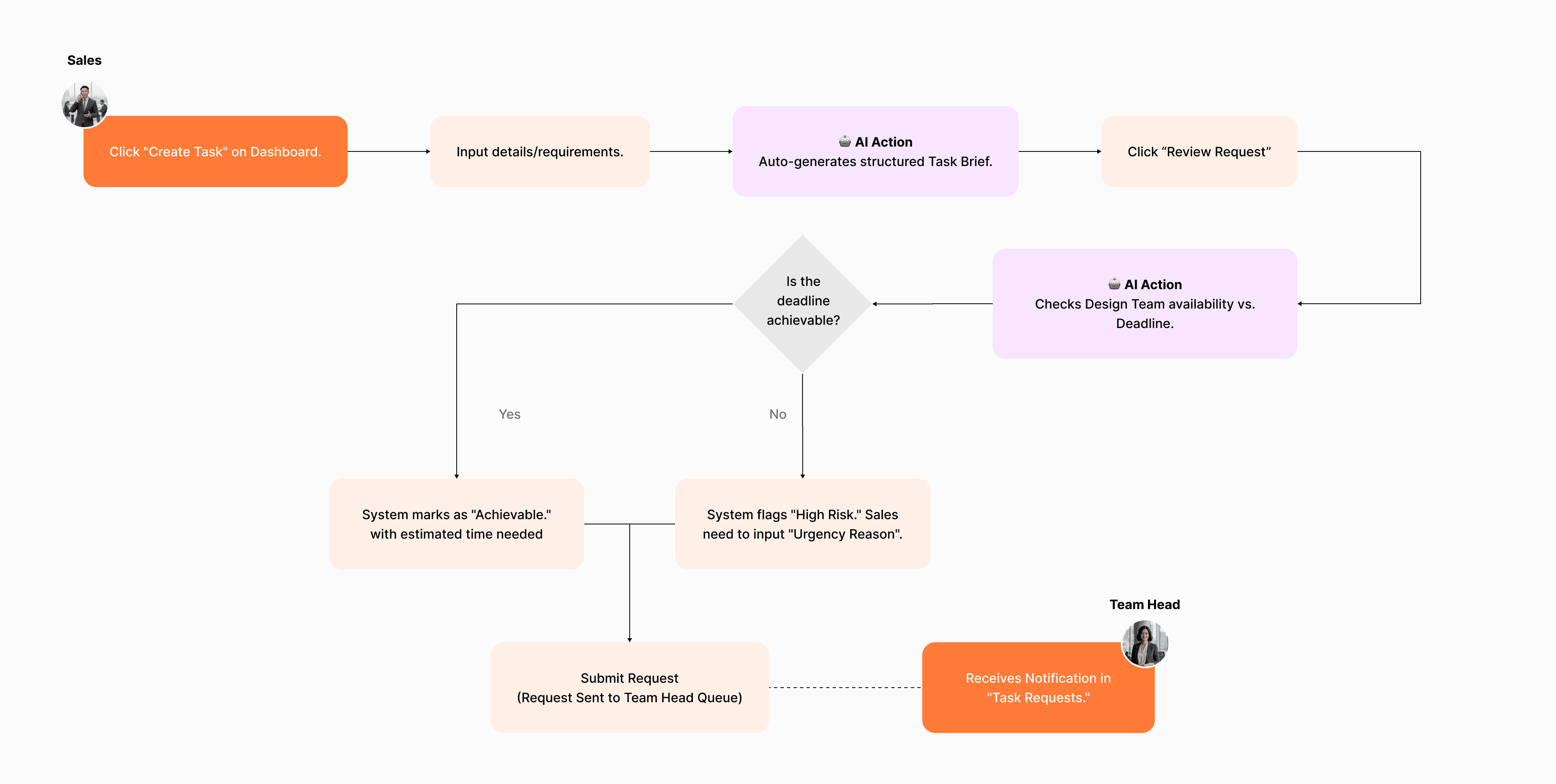
The core friction lay in the "negotiation" of deadlines. I designed a workflow where AI acts as an impartial mediator—validating feasibility instantly so humans can focus on creativity, not logistics.
For Sales Flow (The Request)
Instant Feasibility Check
Instead of emailing 'Can we do this?', Sales Reps get immediate feedback. The AI analyzes the team availability,task complexity and safety buffer against the deadline, flagging high-risk requests before they enter the pipeline.
Team Head Flow (Assignment)
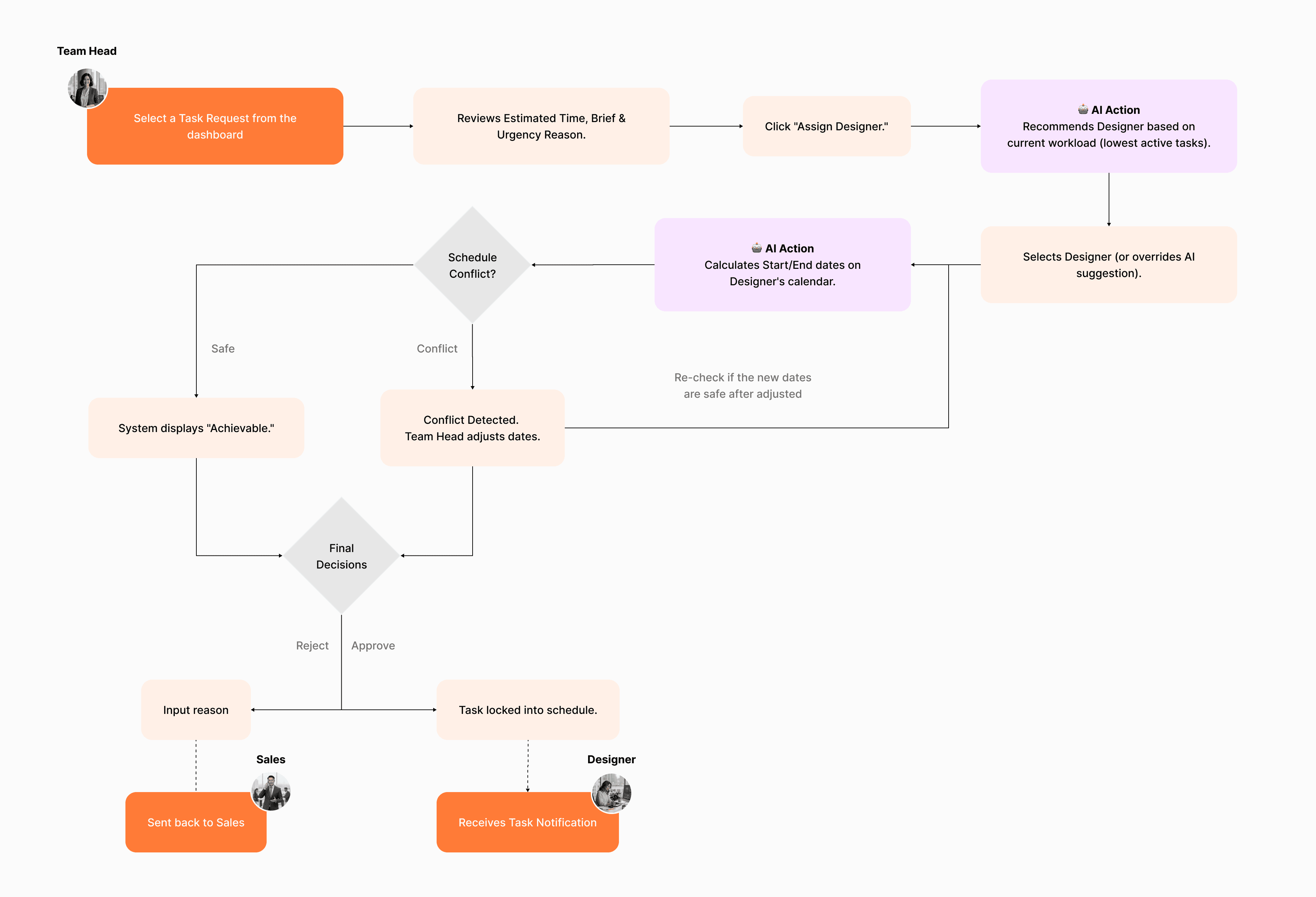
AI-Assisted Resource Allocation
Assigning tasks used to be a manual puzzle. The AI now suggests the best-fit designer based on workload and calculates safe start/end dates, preventing accidental burnout or schedule conflicts.
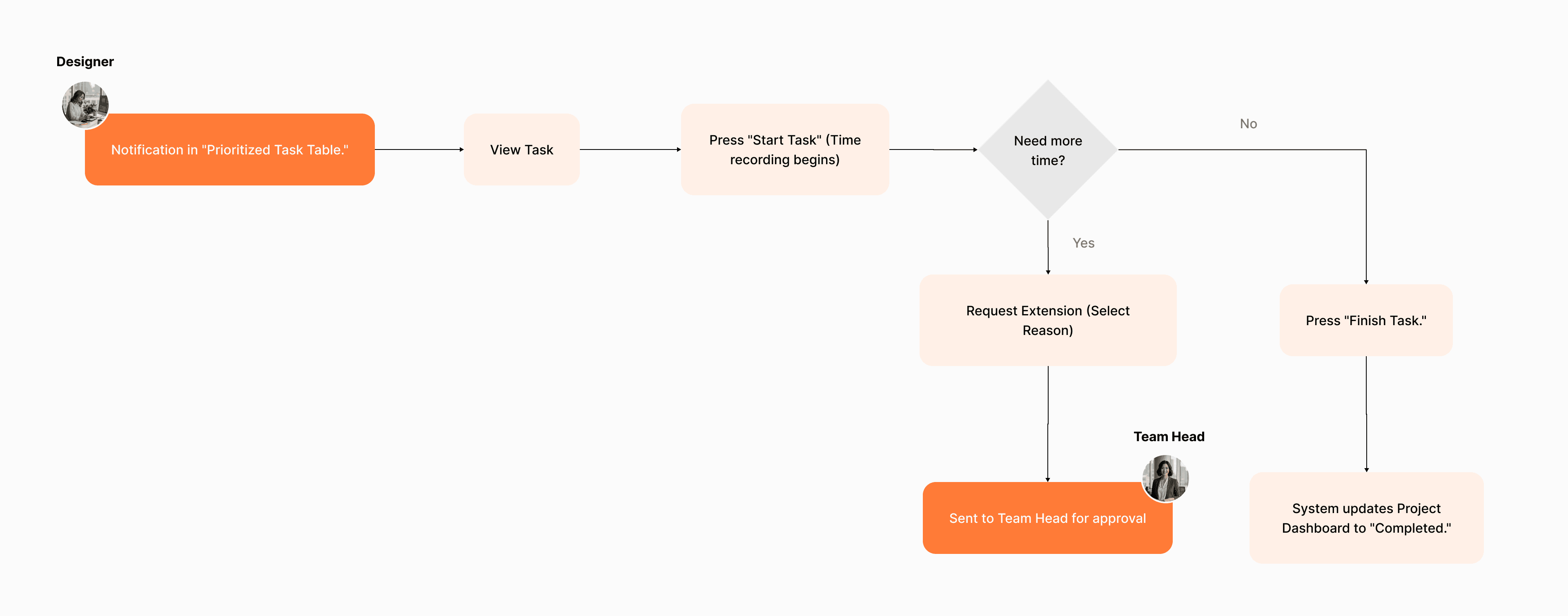
Designer Flow (Execution)
Distraction-Free Execution
Designers receive a prioritized queue with locked-in schedules, allowing them to focus purely on creative work.
FINAL DESIGNS
Smart Briefing & Feasibility Engine
Speed is everything for Sales. Instead of writing vague briefs, users input simple prompts, and AI auto-generates detailed requirements for further modification. Crucially, the system calculates a real-time "Feasibility Comments" before submission, warning sales if a deadline conflicts with the design team's actual availability.
AI-Driven Workload Balancing
Assigning tasks is no longer a manual puzzle. The dashboard provides AI recommended assignee based on designer skills and schedule gaps. It visualized potential conflicts before assignment, ensuring high-priority tasks are staffed without overbooking or burning out the team.
Distraction-Free Work Mode
Designers need focus, not noise. This view filters out administrative clutter, presenting a prioritized list of tasks sorted by urgency and task deadline. With integrated time tracking directly on the card, designers can log efforts without switching tools to record their status on a specific task.
Other features
Context-Aware AI Copilot
Speed is critical in event planning. The AI Copilot streamlines the ideation process by combining natural language chat with one-click Smart Actions. Users can instantly generate mood boards, brainstorm themes, or validate ideas, turning abstract requirements into concrete assets in seconds.
design system
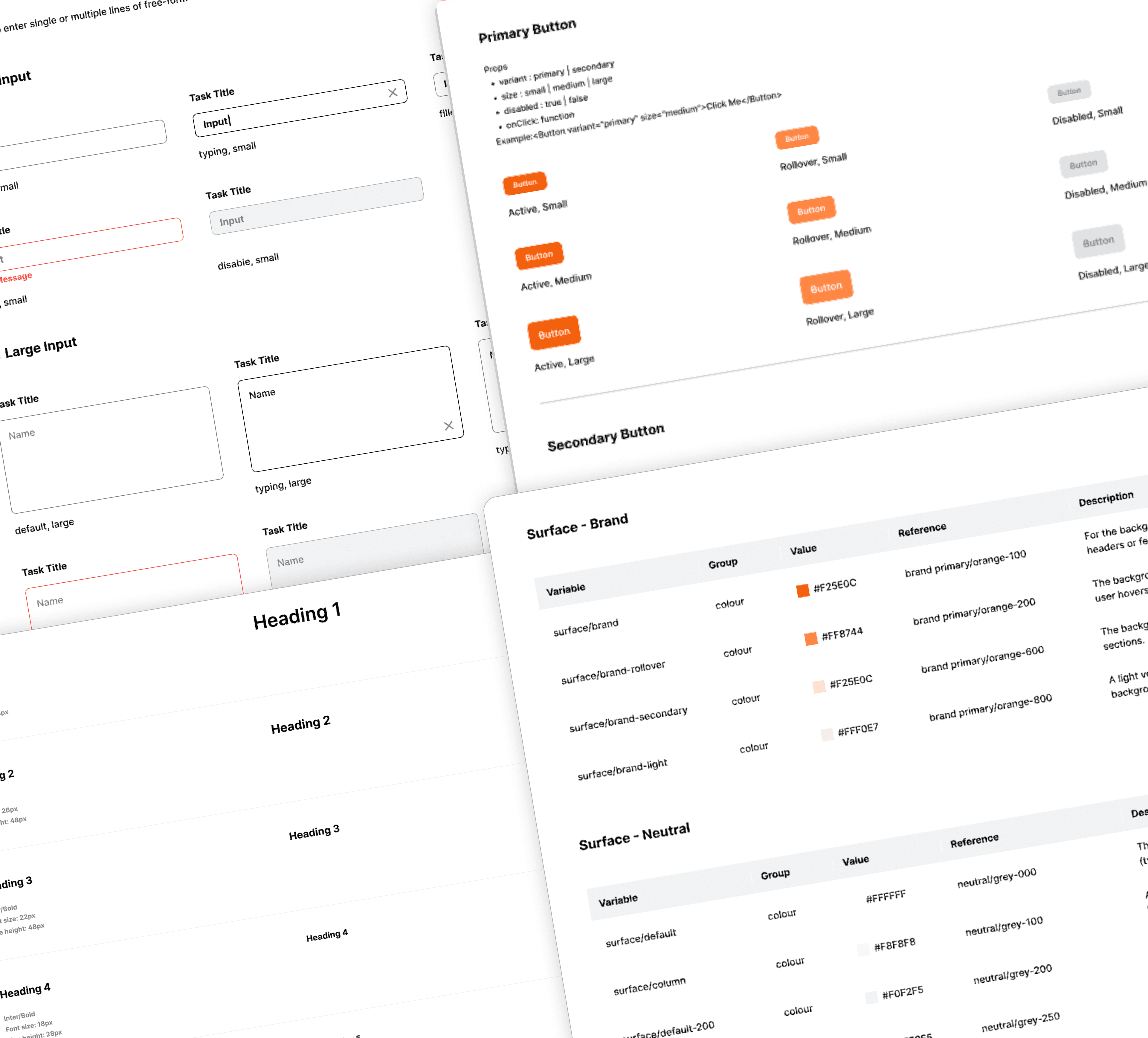
For a complex SaaS platform with multiple user roles, consistency is paramount. To ensure a cohesive user experience and accelerate the development process, I built a comprehensive Design System from the ground up.
Foundations
A defined color palette, typography scale, spacing tokens, and grid system.
Components
20+ reusable components from basic buttons, form inputs, to complex data tables. Each was designed with clear states (default, hover, disabled).
Guidelines
Documentation on when and how to use each component, ensuring that any future feature would integrate seamlessly into the existing platform.
Reflection & Future Outlook
🎯 From Vision to Implementation
Redesigning Eventist’s workflow wasn't just a UI challenge; it was about defining logic for a real-world system. The biggest success was getting the client—who initially feared AI—to embrace the concept of "Augmentation" over "Replacement."
⏳ Balancing Speed and Validation
Due to the project's fast-paced timeline, we prioritized development speed over pre-launch usability testing. Instead, we relied on rigorous stakeholder reviews to ensure the "Feasibility Score" logic aligned with their actual operations.
🚀 The Next Step: Beta Launch
As the project moves into development, the true validation will happen during the Beta release. I look forward to seeing how the team interacts with the live tool and using that real-world data to refine the AI's accuracy in future iterations.
Project Management
AI Intergration
B2B SaaS
Transforming Internal Project Workflows with an AI-Powered Dashboard
In mid-2025, I partnered with a Hong Kong event agency struggling with workflow chaos after their project volume doubled. As the lead freelance UX Designer, my mission was to design a solution from the ground up: Eventist Dashboard is a unified, AI-powered platform to streamline collaboration and project management for their three core user groups: Sales, Team Leads, and Designers.
MY ROLE
UX Designer (Ideation, Wireframe, Interactive Prototype, UI Library / Design System, Information Architecture)
RESULTS
Full-fidelity interactive prototypes covering all core features and user interactions
Secured client buy-in for AI integration, delivered a dev-ready design system, and established a logic-based workflow for implementation.
TIMELINE
3 months (2023)
TEAM
2 Product Designer
background
CLIENT CONTEXT
A Premier Creative Force
Eventist is a premier Hong Kong agency specializing in large-scale corporate events. They built their reputation on creativity and a high-touch, boutique approach to project management.
CHALLENGES
Outgrowing Manual Workflows
In 2025, their project volume doubled overnight, causing manual workflows to crumble. Facing data loss and team burnout, they needed a centralized platform to transition from a boutique operation to a scalable business.
AI INTEGRATION
The AI Mandate vs. User Trust
The client had a requirement that integrating AI to future-proof the agency. I had to design an experience that introduced AI as a supportive partner, turning skepticism into adoption.
Where did I start?
My design process began by looking into the foundational research conducted by the project management team. They performed 13 in-depth, qualitative interviews with key internal stakeholders. So I synthesise these rich findings into an actionable design strategy.
Identifying Problem
Research revealed a tangled workflow lacking a central hub. This caused constant back-and-forth, lost feedback, and duplicated effort.
*Existing workflow diagram for the traditional event and exhibition industry from the research
Understanding Our Internal Users
To pinpoint the source of these growing pains, I investigated the daily workflows of our key internal teams: Sales, Design, and Management based on the research. The analysis uncovered four critical challenges that were creating operational friction and directly impacting project delivery.
Information Silos
"I feel like I'm constantly chasing information instead of doing my actual job."
No Single Source of Truth
"We can't confidently make decisions because we're never sure if we're looking at the latest information."
Inefficient Workflows
"My day is a stream of interruptions that kill my focus and my team's productivity."
Ambiguous Communication
"Vague requests and misaligned expectations lead to endless rework."
How Might We Turn Challenges into Opportunities?
Based on the four core challenges uncovered in the research—Information Silos, No Single Source of Truth, Inefficient Workflows, and Ambiguous Communication—I translated these user frustrations into actionable "How Might We" (HMW) questions. This reframing helped the team shift from a problem-focused mindset to a solution-oriented one.
We brainstormed several HMWs, focusing on the unique needs of our three key user groups:
For the Sales Team
"HMW help our Sales team create clear and reasonable design requests without needing to understand complex design terminology?"
01
For the Team Head
"HMW empower our Team Head to assign tasks efficiently and fairly, with full visibility of her team's workload??"
02
For the Designers
"HMW protect our Designers' focus time by creating a single source of truth for their priorities and reducing constant interruptions??"
03
design principle
Based on the insights, I established three core design principles for th design:
Augmentation
Empowering users, not replacing them. The AI acts as a co-pilot to automate repetitive tasks, allowing users to focus on high-impact, strategic work.
Focused
Delivering role-based clarity. Each user sees a tailored interface with only the information and tools relevant to their specific workflow, eliminating distractions.
Transparency
Building trust through explainable AI. The system provides clear justifications for its recommendations, ensuring every decision is informed and transparent.
Hypothesis & Validation
The Initial Concept
Following research insights and two rounds of stakeholder discovery, the joint directive was to build a comprehensive "All-in-One Ecosystem." A platform that centralizes operations by integrating a full Sales CRM, Real-time Inbox, and Social Feedback Hub directly alongside the AI features.
My grey-scale prototype faithfully visualised these extensive requirements to test the architecture as below.
The Reality Check (The "Aha!" Moment)
However, once stakeholders saw the requirements visualized in the grayscale prototype, the complexity became undeniable.
Operational Redundancy. The Project Manager and Client realized that forcing Sales teams to abandon their existing CRM for this new tool would create friction, not efficiency.
Cognitive Overload. The "everything-at-once" approach diluted the core value proposition—AI assistance.
🔎 Key Decision:
Using the grayscale as a decision tool, I made a joint decision to de-scope. I stripped away the general CRM and communication layers to refocus entirely on the unique value: The AI-Assisted Task Hand-off.
Architecture
To eliminate the friction often found between Sales and Design teams, I designed a unified sitemap and workflow that prioritizes transparency. Instead of relying on back-and-forth emails, the system uses AI to validate deadlines in real-time.
User Flow
The core friction lay in the "negotiation" of deadlines. I designed a workflow where AI acts as an impartial mediator—validating feasibility instantly so humans can focus on creativity, not logistics.
For Sales Flow (The Request)
Instant Feasibility Check
Instead of emailing 'Can we do this?', Sales Reps get immediate feedback. The AI analyzes the team availability,task complexity and safety buffer against the deadline, flagging high-risk requests before they enter the pipeline.
Team Head Flow (Assignment)
AI-Assisted Resource Allocation
Assigning tasks used to be a manual puzzle. The AI now suggests the best-fit designer based on workload and calculates safe start/end dates, preventing accidental burnout or schedule conflicts.
Designer Flow (Execution)
Distraction-Free Execution
Designers receive a prioritized queue with locked-in schedules, allowing them to focus purely on creative work.
FINAL DESIGNS
Smart Briefing & Feasibility Engine
Speed is everything for Sales. Instead of writing vague briefs, users input simple prompts, and AI auto-generates detailed requirements for further modification. Crucially, the system calculates a real-time "Feasibility Comments" before submission, warning sales if a deadline conflicts with the design team's actual availability.
AI-Driven Workload Balancing
Assigning tasks is no longer a manual puzzle. The dashboard provides AI recommended assignee based on designer skills and schedule gaps. It visualized potential conflicts before assignment, ensuring high-priority tasks are staffed without overbooking or burning out the team.
Distraction-Free Work Mode
Designers need focus, not noise. This view filters out administrative clutter, presenting a prioritized list of tasks sorted by urgency and task deadline. With integrated time tracking directly on the card, designers can log efforts without switching tools to record their status on a specific task.
Other features
Context-Aware AI Copilot
Speed is critical in event planning. The AI Copilot streamlines the ideation process by combining natural language chat with one-click Smart Actions. Users can instantly generate mood boards, brainstorm themes, or validate ideas, turning abstract requirements into concrete assets in seconds.
design system
For a complex SaaS platform with multiple user roles, consistency is paramount. To ensure a cohesive user experience and accelerate the development process, I built a comprehensive Design System from the ground up.
Foundations
A defined color palette, typography scale, spacing tokens, and grid system.
Components
20+ reusable components from basic buttons, form inputs, to complex data tables. Each was designed with clear states (default, hover, disabled).
Guidelines
Documentation on when and how to use each component, ensuring that any future feature would integrate seamlessly into the existing platform.
Reflection & Future Outlook
🎯 From Vision to Implementation
Redesigning Eventist’s workflow wasn't just a UI challenge; it was about defining logic for a real-world system. The biggest success was getting the client—who initially feared AI—to embrace the concept of "Augmentation" over "Replacement."
⏳ Balancing Speed and Validation
Due to the project's fast-paced timeline, we prioritized development speed over pre-launch usability testing. Instead, we relied on rigorous stakeholder reviews to ensure the "Feasibility Score" logic aligned with their actual operations.
🚀 The Next Step: Beta Launch
As the project moves into development, the true validation will happen during the Beta release. I look forward to seeing how the team interacts with the live tool and using that real-world data to refine the AI's accuracy in future iterations.
Project Management
AI Intergration
B2B SaaS
Transforming Internal Project Workflows with an AI-Powered Dashboard
In mid-2025, I partnered with a Hong Kong event agency struggling with workflow chaos after their project volume doubled. As the lead freelance UX Designer, my mission was to design a solution from the ground up: Eventist Dashboard is a unified, AI-powered platform to streamline collaboration and project management for their three core user groups: Sales, Team Leads, and Designers.
MY ROLE
UX Designer (Ideation, Wireframe, Interactive Prototype, UI Library / Design System, Information Architecture)
TEAM
Project Manager, 2 UI Designers, UX Designer (Me),
TIMELINE
5 months (mid - late 2025 )
RESULTS
Full-fidelity interactive prototypes covering all core features and user interactions
Secured client buy-in for AI integration, delivered a dev-ready design system, and established a logic-based workflow for implementation.
background
CLIENT CONTEXT
A Premier Creative Force
Eventist is a premier Hong Kong agency specializing in large-scale corporate events. They built their reputation on creativity and a high-touch, boutique approach to project management.
CHALLENGES
Outgrowing Manual Workflows
In 2025, their project volume doubled overnight, causing manual workflows to crumble. Facing data loss and team burnout, they needed a centralized platform to transition from a boutique operation to a scalable business.
AI INTEGRATION
The AI Mandate vs. User Trust
The client had a requirement that integrating AI to future-proof the agency. I had to design an experience that introduced AI as a supportive partner, turning skepticism into adoption.
Where did I start?
My design process began by looking into the foundational research conducted by the project management team. They performed 13 in-depth, qualitative interviews with key internal stakeholders. So I synthesise these rich findings into an actionable design strategy.
Identifying Problem
Research revealed a tangled workflow lacking a central hub. This caused constant back-and-forth, lost feedback, and duplicated effort.
*Existing workflow diagram for the traditional event and exhibition industry from the research
Understanding Our Internal Users
To pinpoint the source of these growing pains, I investigated the daily workflows of our key internal teams: Sales, Design, and Management based on the research. The analysis uncovered four critical challenges that were creating operational friction and directly impacting project delivery.
Information Silos
"I feel like I'm constantly chasing information instead of doing my actual job."
No Single Source of Truth
"We can't confidently make decisions because we're never sure if we're looking at the latest information."
Inefficient Workflows
"My day is a stream of interruptions that kill my focus and my team's productivity."
Ambiguous Communication
"Vague requests and misaligned expectations lead to endless rework."
How Might We Turn Challenges into Opportunities?
Based on the four core challenges uncovered in the research—Information Silos, No Single Source of Truth, Inefficient Workflows, and Ambiguous Communication—I translated these user frustrations into actionable "How Might We" (HMW) questions. This reframing helped the team shift from a problem-focused mindset to a solution-oriented one.
We brainstormed several HMWs, focusing on the unique needs of our three key user groups:
For the Sales Team
"HMW help our Sales team create clear and reasonable design requests without needing to understand complex design terminology?"
01
For the Team Head
"HMW empower our Team Head to assign tasks efficiently and fairly, with full visibility of her team's workload??"
02
For the Designers
"HMW protect our Designers' focus time by creating a single source of truth for their priorities and reducing constant interruptions??"
03
design principle
Based on the insights, I established three core design principles for th design:
Augmentation
Empowering users, not replacing them. The AI acts as a co-pilot to automate repetitive tasks, allowing users to focus on high-impact, strategic work.
Focused
Delivering role-based clarity. Each user sees a tailored interface with only the information and tools relevant to their specific workflow, eliminating distractions.
Transparency
Building trust through explainable AI. The system provides clear justifications for its recommendations, ensuring every decision is informed and transparent.
Hypothesis & Validation
The Initial Concept
Following research insights and two rounds of stakeholder discovery, the joint directive was to build a comprehensive "All-in-One Ecosystem." A platform that centralizes operations by integrating a full Sales CRM, Real-time Inbox, and Social Feedback Hub directly alongside the AI features.
My grey-scale prototype faithfully visualised these extensive requirements to test the architecture as below.
The Reality Check (The "Aha!" Moment)
However, once stakeholders saw the requirements visualized in the grayscale prototype, the complexity became undeniable.
Operational Redundancy. The Project Manager and Client realized that forcing Sales teams to abandon their existing CRM for this new tool would create friction, not efficiency.
Cognitive Overload. The "everything-at-once" approach diluted the core value proposition—AI assistance.
🔎 Key Decision: Using the grayscale as a decision tool, I made a joint decision to de-scope. I stripped away the general CRM and communication layers to refocus entirely on the unique value: The AI-Assisted Task Hand-off.
Architecture
To eliminate the friction often found between Sales and Design teams, I designed a unified sitemap and workflow that prioritizes transparency. Instead of relying on back-and-forth emails, the system uses AI to validate deadlines in real-time.
User Flow
The core friction lay in the "negotiation" of deadlines. I designed a workflow where AI acts as an impartial mediator—validating feasibility instantly so humans can focus on creativity, not logistics.
For Sales Flow (The Request)
Instant Feasibility Check
Instead of emailing 'Can we do this?', Sales Reps get immediate feedback. The AI analyzes the team availability,task complexity and safety buffer against the deadline, flagging high-risk requests before they enter the pipeline.
Team Head Flow (Assignment)
AI-Assisted Resource Allocation
Assigning tasks used to be a manual puzzle. The AI now suggests the best-fit designer based on workload and calculates safe start/end dates, preventing accidental burnout or schedule conflicts.
Designer Flow (Execution)
Distraction-Free Execution
Designers receive a prioritized queue with locked-in schedules, allowing them to focus purely on creative work.
FINAL DESIGNS
Smart Briefing & Feasibility Engine
Speed is everything for Sales. Instead of writing vague briefs, users input simple prompts, and AI auto-generates detailed requirements for further modification. Crucially, the system calculates a real-time "Feasibility Comments" before submission, warning sales if a deadline conflicts with the design team's actual availability.
AI-Driven Workload Balancing
Assigning tasks is no longer a manual puzzle. The dashboard provides AI recommended assignee based on designer skills and schedule gaps. It visualized potential conflicts before assignment, ensuring high-priority tasks are staffed without overbooking or burning out the team.
Distraction-Free Work Mode
Designers need focus, not noise. This view filters out administrative clutter, presenting a prioritized list of tasks sorted by urgency and task deadline. With integrated time tracking directly on the card, designers can log efforts without switching tools to record their status on a specific task.
Other features
Context-Aware AI Copilot
Speed is critical in event planning. The AI Copilot streamlines the ideation process by combining natural language chat with one-click Smart Actions. Users can instantly generate mood boards, brainstorm themes, or validate ideas, turning abstract requirements into concrete assets in seconds.
design system
For a complex SaaS platform with multiple user roles, consistency is paramount. To ensure a cohesive user experience and accelerate the development process, I built a comprehensive Design System from the ground up.
Foundations
A defined color palette, typography scale, spacing tokens, and grid system.
Components
20+ reusable components from basic buttons, form inputs, to complex data tables. Each was designed with clear states (default, hover, disabled).
Guidelines
Documentation on when and how to use each component, ensuring that any future feature would integrate seamlessly into the existing platform.
Reflection & Future Outlook
🎯 From Vision to Implementation
Redesigning Eventist’s workflow wasn't just a UI challenge; it was about defining logic for a real-world system. The biggest success was getting the client—who initially feared AI—to embrace the concept of "Augmentation" over "Replacement."
⏳ Balancing Speed and Validation
Due to the project's fast-paced timeline, we prioritized development speed over pre-launch usability testing. Instead, we relied on rigorous stakeholder reviews to ensure the "Feasibility Score" logic aligned with their actual operations.
🚀 The Next Step: Beta Launch
As the project moves into development, the true validation will happen during the Beta release. I look forward to seeing how the team interacts with the live tool and using that real-world data to refine the AI's accuracy in future iterations.